




Maybank recently announced that customers can now make payments in Thailand, Singapore and Indonesia via the MAE app.
The bank said that with the new Cross-border DuitNow QR feature, customers can use the app to scan the local QR code and pay merchants.
Below are the QR codes that you’ll need to look out for:
- NETS (Singapore)
- Thai QR Payment or Prompt Pay (Thailand)
- QRIS in (Indonesia)
The bank also mentioned that you can only select current and savings accounts to pay and advised customers to update their mobile device’s operating system to Android 9 and above or iOS 13 and above to use the MAE App.
How to make payments:
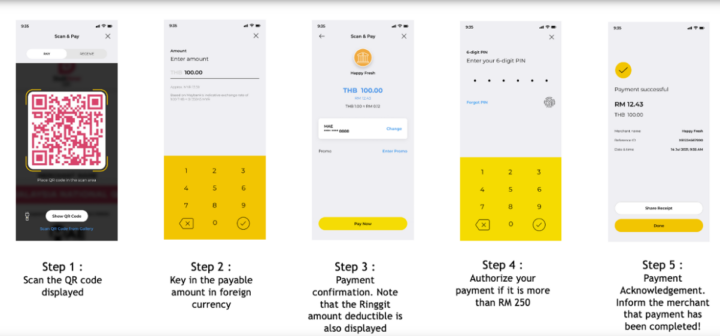
- Launch your MAE app and tap on the QR logo
- Scan the overseas merchant’s QR code displayed
- Key in a payable amount in foreign currency
- Payment confirmation. Note that the Ringgit amount deductible is also displayed
- Authorise your payment if it is more than RM250
- Payment acknowledgment. Inform the merchant that payment has been completed
In case you’re worried that you’ll overspend, the bank said that there is a daily cap of RM1,000 or equivalent to RM1,000 in foreign currency or up to the daily limit you’ve set.